G16 Pro True Wireless Earbuds
User Manual
Charging case with color touchscreen: lyrics, battery, track control, EQ and custom wallpapers at a glance.
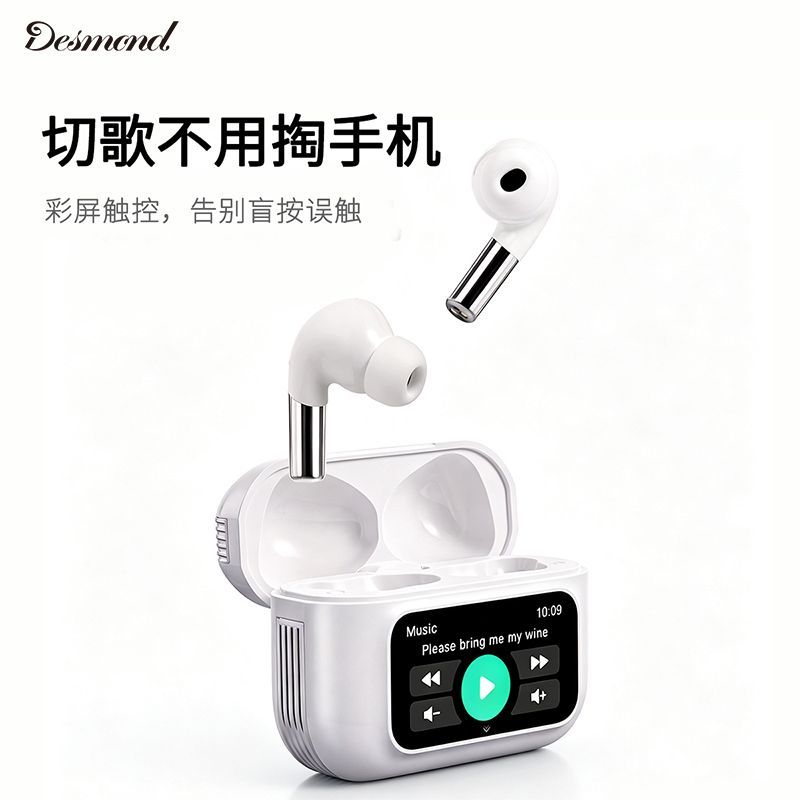
- Color touchscreen on the case: lyrics, battery, track control and EQ
- 13mm copper-ring driver with bass-enhancement tuning
- ENC call noise reduction for clear calls anywhere
- Game mode with Bluetooth 6.0 for low-latency audio
- Hall-sensor auto connect, each earbud works independently
- Works with iOS, Android and computers; featherlight fit
1Package Contents
| Earbuds | 1 left + 1 right |
|---|---|
| Charging case (with screen) | 1 |
| Charging cable | Type-C cable × 1 |
| Spare ear tips | 1 set (sizes vary by unit) |
| User manual | 1 |
Contents may vary by shipment.
2Case Screen Functions

| Music control | Lyrics, skip tracks, play/pause, volume, EQ |
|---|---|
| Status | Earbud and case battery, connection status at a glance |
| Mode switch | One-tap switch between Music / Game modes |
| Customization | Freely customizable wallpapers |
| Fun extras | Remote shutter for phone camera, casual mini games |
The screen is touch-sensitive. Swipe or tap to operate; see Section 5 for gestures.
3Specifications
| Product | G16 Pro True Wireless Earbuds with Screen |
|---|---|
| Bluetooth | Bluetooth 6.0 |
| Driver | 13mm copper-ring dynamic driver |
| Call noise reduction | ENC |
| Case screen | Color touchscreen (size TBD) |
| Battery / playtime | TBD |
| Water resistance | TBD |
| Compatibility | iOS / Android / computers (Bluetooth) |
Sample values: Replace screen size, battery, playtime and water resistance with final G16 Pro specs before publishing.
4Getting Started
5Touch Controls
| Action | Earbuds (L/R) | Case screen |
|---|---|---|
| Play / pause | Double tap | Tap play button |
| Skip track | Triple tap left (prev) / right (next) | Tap track buttons |
| Answer / end call | Double tap | — |
| Reject call | Press and hold 2 s | — |
| Volume | TBD (per final firmware) | Swipe on screen |
| Mode switch | — | Tap Music / Game mode |
Gestures may vary slightly by firmware version; refer to the quick guide in the box.
6Videos
Official demo: screen functions · touch controls · sound quality
Note: Replace this placeholder with the final product video (embed from Bilibili / YouTube / your own CDN player) before launch.
7G16 Pro Product FAQ
How do I pair with my phone?
Open the case lid and take out the earbuds, then select “G16 Pro” in the Bluetooth list. After the first pairing, they auto-reconnect whenever you open the lid.
My earbuds won't connect to my phone.
Put the earbuds back and close the lid for 10 seconds, reopen it, delete the old “G16 Pro” record in Bluetooth settings, then search again. If it still fails, reset the earbuds (see below).
How do I reset the earbuds?
Put both earbuds back into the case and hold the case button (if available) for about 5 seconds until the indicator flashes, or close the lid for 10 seconds and reopen it. Exact steps depend on the firmware.
Can I use only one earbud?
Yes. Either earbud works alone for calls or music; using both restores stereo.
The case screen stays dark. What should I do?
Make sure the case has battery. Charge for about 1 minute and check again. If it still stays off, reset the case (if supported) or contact support.
Can the screen show lyrics?
Yes. When playing music from a lyrics-synced app, the screen can show lyrics and playback info.
How do I change the wallpaper?
Use the companion app (if available) or the screen settings page to pick a preset wallpaper; the exact entry depends on the firmware.
One earbud has no sound. What should I do?
Put that earbud back into the case and take it out to reconnect; check the phone volume and channel balance; if it still fails, contact support.
People can't hear me clearly on calls.
This product features ENC call noise reduction. Make sure the earbuds fit snugly and the mic openings are not blocked; in noisy places, speak closer to the microphone.
How long does the case take to charge? What is the playtime?
Depends on the final product specs (being added). We recommend fully charging the case and earbuds before first use.
Is it waterproof?
Water resistance depends on the final product specs (being added). Keep it away from liquids while charging.
How do I enable Game mode?
Switch to Game mode on the case screen. Game mode provides lower latency and better audio-sync.
8Safety
- Avoid prolonged listening at high volume to protect your hearing.
- Use caution while cycling, driving or in situations requiring situational awareness.
- Use a certified charger and cable; do not charge in humid environments.
- Do not disassemble, modify or dispose of the product in fire.
- Children should use the product under adult supervision.